
Office Ergonomics and Back Pain Prevention for Indian Employees
Medically reviewed by: pending
Last updated 21 October 2026
Set up desks, chairs and screens to cut back and neck pain, plus a simple ergonomic assessment checklist for HR teams.
By the Plan My Health corporate health team
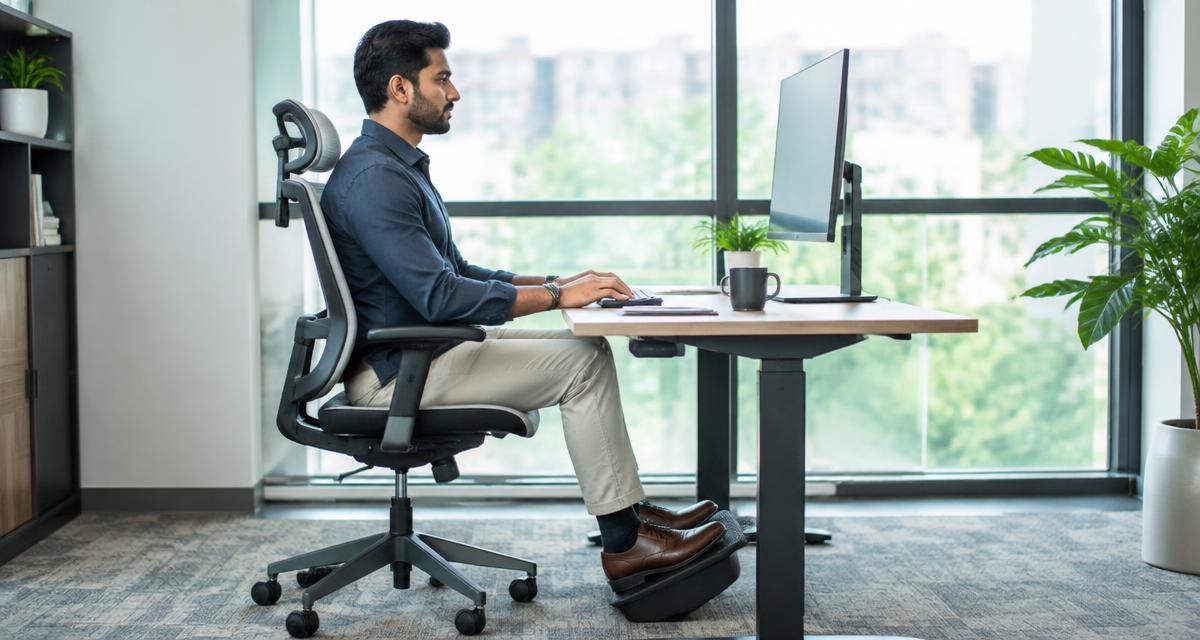
Back and neck pain are among the most common complaints in offices, and long hours of sitting in a poor posture are a big part of the reason. Good ergonomics — fitting the workstation to the person rather than the other way round — reduces strain on the spine, neck, shoulders and wrists. Most fixes are simple and inexpensive, and an ergonomic assessment helps you find the people who need them.
This guide covers how to set up a desk, chair and screen, the habits that matter as much as furniture, how to run an ergonomic assessment and when to refer someone for medical care. Our corporate wellness sessions include ergonomics and posture workshops.
Why ergonomics matters
Sitting itself is not the only problem; sitting still in one awkward position for hours is. A screen too low pulls the head forward, a chair without lower-back support rounds the spine, and a keyboard too high lifts the shoulders. Over weeks and months these small strains add up to pain, stiffness and reduced concentration. Hybrid work has made it worse for many people working from dining tables, sofas and beds.
Setting up the workstation
- Chair: adjust height so feet rest flat on the floor or a footrest, with knees about level with hips; use the backrest and lower-back support
- Screen: about an arm's length away, with the top of the screen at or slightly below eye level; place it directly in front, not to one side
- Laptops: use a stand or a stack of books with a separate keyboard and mouse for long sessions
- Keyboard and mouse: close to the body, at elbow height, with wrists straight and shoulders relaxed
- Desk: enough space to keep frequently used items within easy reach
- Lighting: reduce glare from windows and overhead lights; see our employee eye checkup guide
Habits that matter as much as furniture
- Change position at least every 30 to 60 minutes; stand, stretch or walk
- Take phone calls standing or walking where possible
- Use short stretching breaks for neck, shoulders and lower back — our desk yoga routine is a simple starting point
- Stay active outside work; general fitness supports a healthy back
Running an ergonomic assessment
An ergonomic assessment checks each workstation against a simple standard and asks employees about discomfort. It can be self-assessed with a checklist, done by a trained facility or HR person, or carried out by a physiotherapist for people who already have pain.
A simple checklist for HR teams:
- Is the chair adjustable, and is it adjusted correctly for the user?
- Are feet supported, knees about level with hips?
- Is the screen at the right height and distance, directly in front?
- Are keyboard and mouse at elbow height, with wrists straight?
- Is there glare on the screen?
- Does the person take regular movement breaks?
- Does the person report pain or discomfort in the back, neck, shoulders or wrists?
- For home workers: is there a suitable table and chair for full working days?
Act on the answers: adjust settings on the spot, provide simple aids such as laptop stands or footrests, and refer people with ongoing pain.
When to refer
Most back and neck pain improves with movement and simple changes. Refer to a doctor or physiotherapist if pain lasts more than a few weeks, keeps returning, spreads down an arm or leg, or comes with numbness, tingling or weakness. Severe pain after an injury, loss of bladder or bowel control, or fever with back pain needs urgent medical care.
Making it a programme
Combine a workstation assessment with posture talks, stretching sessions and access to physiotherapy advice. A health risk assessment can include musculoskeletal questions so you can see, in anonymised form, how common pain is across teams. Costs depend on headcount, format and whether physiotherapist assessments are included; any figure is indicative until scope is agreed.
How Plan My Health helps
We run ergonomics workshops, posture and stretching sessions and physiotherapy consultations for offices across India, alongside checkups and health risk assessments. Explore our employee health checkup packages or send us an enquiry.
FAQs
What is the correct monitor height?
The top of the screen should be at or slightly below eye level, about an arm's length away and directly in front of you.
How often should office employees take movement breaks?
Change position or move at least every 30 to 60 minutes; short, frequent breaks are better than one long one.
What is an ergonomic assessment?
A check of each workstation and the user's posture and discomfort against a simple standard, followed by adjustments and referrals where needed.
When should back pain be seen by a doctor?
If it lasts more than a few weeks, keeps returning, spreads down a limb or comes with numbness, weakness or other worrying signs. Some symptoms need urgent care.
Share this article
Pick a tagline
The highlighted image above appears automatically as the preview picture on WhatsApp, LinkedIn and Facebook.
Related services
Want this for your workforce?
Start free with 25 employee health risk assessments and a corporate dashboard.
Get started for corporates